Your VLANs Are Talking - Do You Know What They're Saying?

Last month we analyzed a "fully segmented" enterprise network. Within 48 hours we surfaced 127 cross-zone flows nobody knew existed, shut down 18 stale firewall rules, and caught a staging server quietly syncing 14 GB of production data every night.
The Illusion of Segmentation
47 workstations had direct SQL connections to production databases - completely bypassing the application tier.
A staging server had been syncing data FROM production for 8 months.
The development VLAN had open SSH access to every server in the datacenter.
When we overlaid that traffic against the segmentation policies, the security team suddenly had proof: what looked segmented in Visio was a flat mesh in real life.
All of this traffic was passing through the firewall. All of it was "allowed" by forgotten rules created years ago.
The network was segmented on paper. In reality? Flat as a pancake.
The Visibility Gap
Here's the uncomfortable truth: firewalls tell you what's blocked. They don't tell you what's actually flowing.
You might have perfect firewall rules. But can you answer these questions right now?
- Which servers are your workstations connecting to directly?
- Is any traffic flowing between zones that shouldn't communicate?
- Has a new connection pattern emerged in the last 24 hours?
If you can't answer these confidently, you're not alone.
Why This Matters
Lateral movement is the #1 technique attackers use once inside a network. A compromised workstation becomes a pivot point. A misconfigured server becomes a bridge between zones.
Segmentation isn't just a compliance checkbox. It's your last line of defense when perimeter security fails.
But segmentation only works if it's actually enforced - and continuously verified.
A Different Approach
We built Network Segmentation Analysis in Tripl-i because we got tired of hearing "we thought we were segmented" during incident reviews.
Instead of just blocking traffic, we show you:
- Real traffic flows between every zone in your network
- Policy violations when traffic crosses boundaries it shouldn't
- IP-by-IP details so you can investigate exactly what's happening
You define what should be allowed. We alert you when reality doesn't match policy.
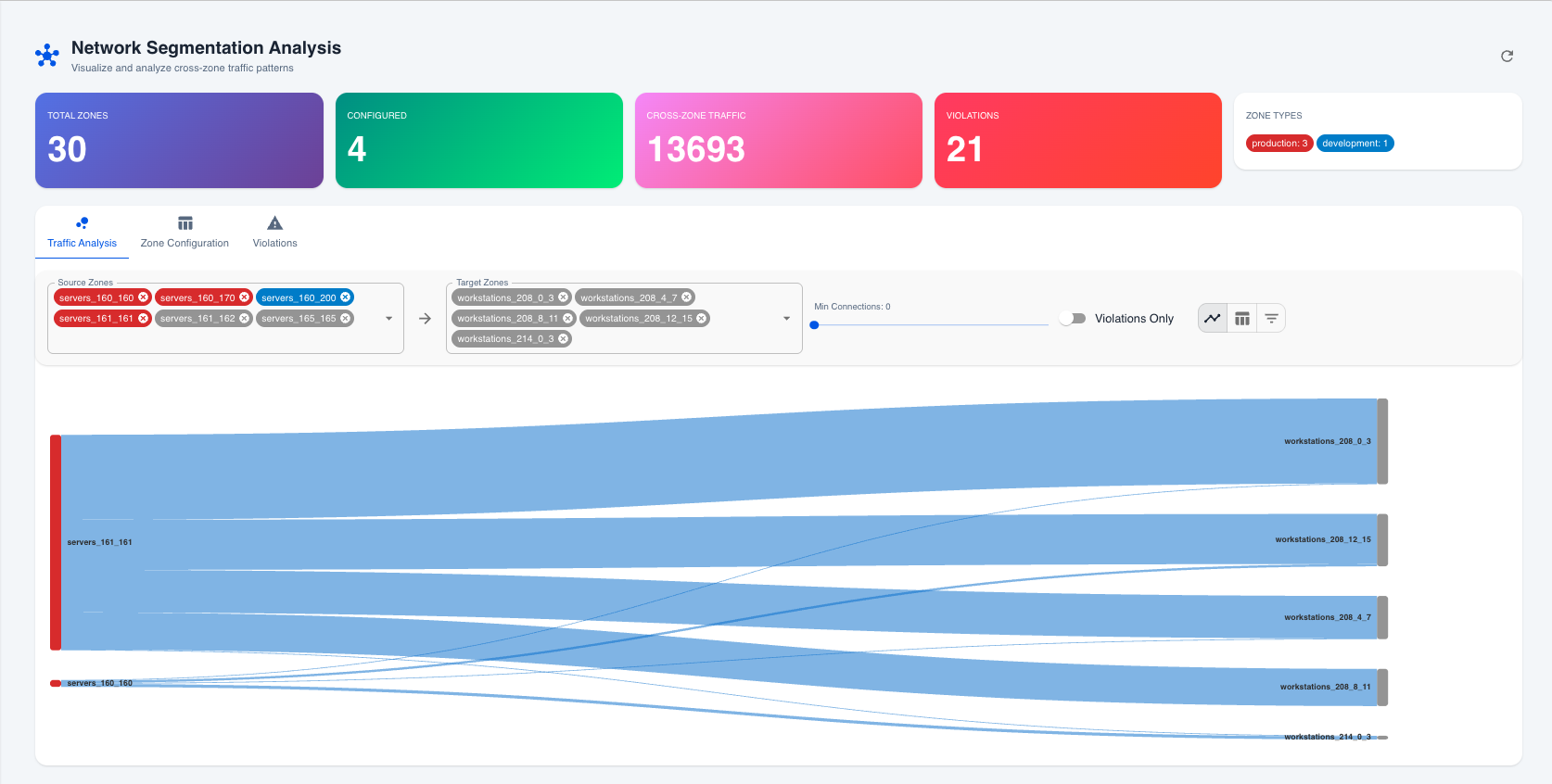
Inside the visibility layer
Each view in the module answers a different question:
- Sankey Flow (above) – Executive-friendly picture of how much volume is moving between zones.
- Matrix View – Shows every source/target pair, port, and violation status so responders know exactly which firewall rule or ACL to adjust.
- IP-by-IP Panel – Lists the actual endpoints, connection counts, and processes that triggered the violation so you can trace the blast radius.
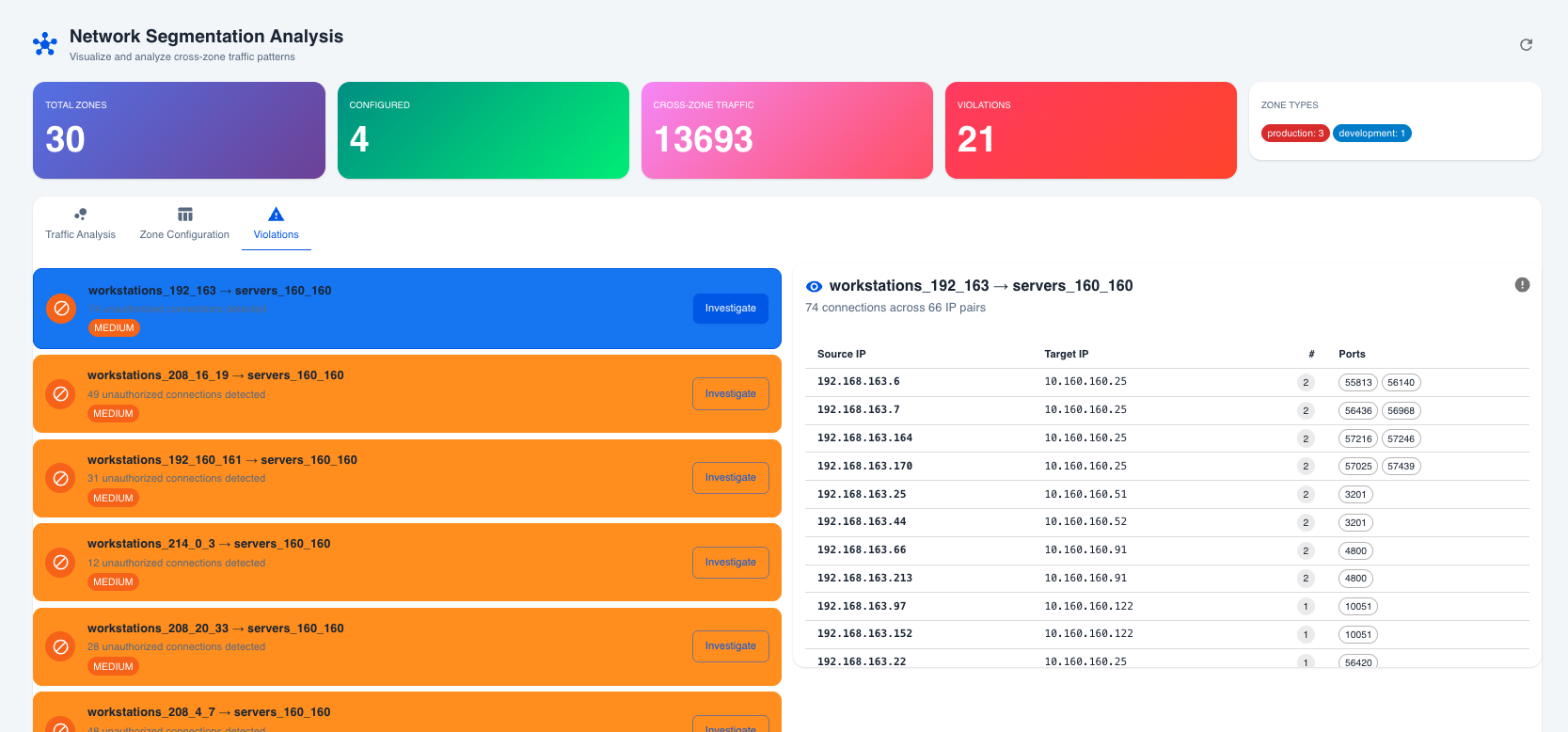
Need help mapping those views to your policy design? The module overview and quick start guide walk through every screen, and the zone configuration guide explains how to encode your policy decisions.
Real-World Scenarios
Scenario 1: Database Protection
Your databases should only receive connections from application servers - not directly from user workstations. Set Database Zone to allow inbound only from App Zone. Any developer connecting via local SQL client? Instant violation alert.
Scenario 2: Ransomware Prevention
Ransomware spreads through lateral movement. If a workstation gets compromised, it shouldn't be able to reach your backup servers. Configure Backup Zone to allow only Management Zone. Workstation tries to encrypt backups? Detected immediately.
Scenario 3: Compliance Evidence
PCI-DSS requires network segmentation for cardholder data. Instead of hoping your firewall rules are correct, you now have continuous proof of what's actually crossing zone boundaries.
From alert to action
- Detect – Violations fire automatically whenever a zone receives traffic from an unapproved peer. No manual query required.
- Investigate – Pivot into the IP-by-IP drawer to see which device initiated the flow, which port was used, and whether this is part of a trend.
- Decide – If the traffic is legitimate, update the zone’s Allowed Inbound list directly from the violation. If not, create or tighten the firewall rule and document the incident.
- Prove – Export the matrix for audit evidence or pipe the alert into your SIEM/SOAR workflow so GRC teams have continuous assurance.
Run that loop daily and you’ll never again wonder whether a “temporary” exception silently reopened half the data center.
The Question You Should Be Asking
The question isn't whether unauthorized traffic exists in your network.
The question is: do you know about it?
Network Segmentation Analysis is available now in Tripl-i v3.9.0. Learn more, run the quick start checklist, or jump straight into zone configuration best practices to harden your boundaries today. If you’d like us to run a segmentation health check on your environment, drop us a line—your VLANs are talking, and we’ll show you what they’re saying.