Network Segmentation Analysis
Tripl-i Network Segmentation Analysis provides comprehensive visibility into traffic flows between network zones, enabling security teams to identify unauthorized communications, policy violations, and potential security risks across your infrastructure.
What is Network Segmentation Analysis?
Network Segmentation Analysis is an automated process of:
- Visualizing traffic flows between network zones
- Detecting unauthorized cross-zone communications
- Identifying policy violations in real-time
- Investigating specific connections IP-by-IP
- Enforcing security boundaries between network segments
Why Network Segmentation Matters
Without segmentation analysis, organizations face unknown traffic flows, hidden violations, security blind spots, and compliance gaps. Tripl-i addresses each of these with complete traffic visibility, real-time violation detection, IP-by-IP investigation, and compliance enforcement.
Key Features
Traffic Flow Visualization
View cross-zone traffic in multiple formats:
| View Mode | Best For | Description |
|---|---|---|
| Sankey Diagram | Executive overview | Visual flow diagram showing traffic volumes between zones |
| Matrix View | Detailed analysis | Tabular view with connections, ports, and violation status |
| List View | Quick scanning | Card-based view for rapid assessment |
Zone Configuration
Define security zones based on your network topology:
Available Zone Types:
| Zone Type | Purpose |
|---|---|
| Production | Critical business systems |
| DMZ | Internet-facing services |
| Management | Administrative access |
| Workstation | End-user devices |
| IoT | Internet of Things devices |
| Guest | Visitor network access |
| Development | Development environments |
| Staging | Pre-production testing |
| Backup | Data backup systems |
Security Levels:
| Level | Description |
|---|---|
| Critical | Highest protection required |
| High | Significant security controls |
| Medium | Standard security measures |
| Low | Basic security requirements |
Violation Detection
The system automatically identifies unauthorized traffic using a straightforward evaluation process:
- A network connection is detected between two zones
- The system checks the source zone against the target zone's allowed inbound list
- If the source zone is not in the allowed list, the traffic is flagged as a violation
- An alert is generated and investigation is recommended
IP-by-IP Investigation
Drill down into specific violations to see:
- Source IP addresses
- Target IP addresses
- Connection counts
- Destination ports
- Process names (when available)
Dashboard Overview
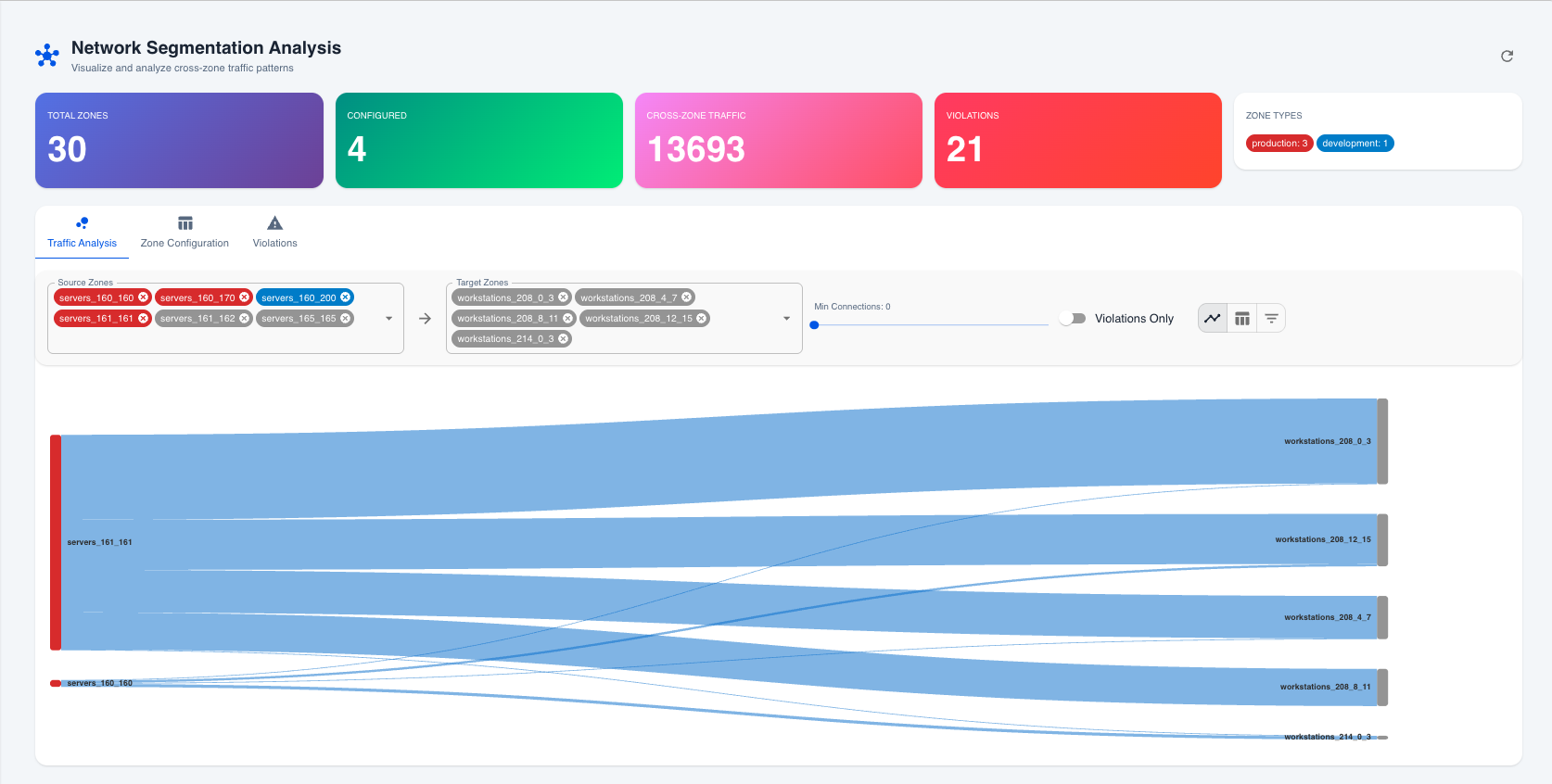 Network Segmentation Analysis dashboard showing traffic flows between zones
Summary Cards
The dashboard displays key metrics at a glance:
| Metric | Description |
|---|---|
| Total Zones | Number of network zones configured |
| Configured | Zones with security policies defined |
| Cross-Zone Traffic | Total connections between different zones |
| Violations | Number of policy violations detected |
Traffic Analysis Tab
The Traffic Analysis tab provides filtering and visualization options:
Available Filters:
- Source Zones — Multi-select filter for traffic origin
- Target Zones — Multi-select filter for traffic destination
- Min Connections — Slider to filter by connection volume
- Violations Only — Toggle to show only violations
View Options: Flow Diagram (Sankey), Matrix View (Table), or List View (Cards)
Zone Configuration Tab
Manage zone security settings:
| Setting | Purpose |
|---|---|
| Zone Type | Classification (Production, DMZ, etc.) |
| Security Level | Priority level (Critical, High, Medium, Low) |
| Allowed Inbound | Zones permitted to connect TO this zone |
| Description | Human-readable zone description |
| Color | Visual identifier for dashboards |
Violations Tab
Investigate security violations:
- Violation List — All detected policy violations with severity
- Investigation Panel — Detailed connection information
- Remediation Guidance — Suggested actions to resolve
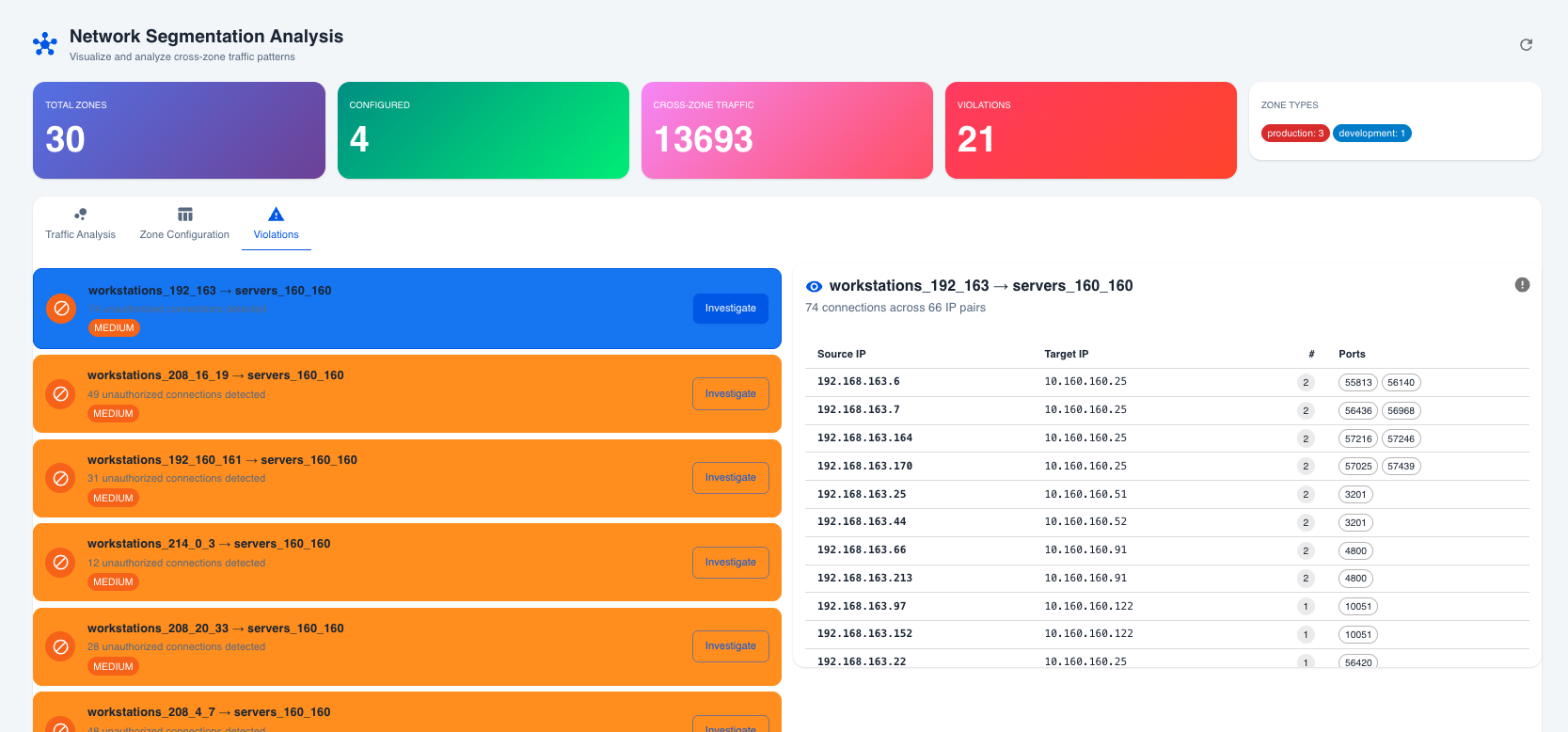 Violations tab showing IP-by-IP connection details for investigation
How Zones Are Created
Network zones are automatically created from your Discovery Schedules. Each discovery schedule defines:
- IP Range — The network subnet (e.g., 10.160.160.0/24)
- Zone Name — Auto-generated or custom name
- Agent — The discovery agent managing this zone
Violation Rules
How Violations Are Detected
Violations are calculated in real-time based on zone configuration:
- If a target zone has "Allowed Inbound" configured, only traffic from zones in the allowed list is permitted
- Traffic from any zone NOT in the allowed list is flagged as a violation
Example: A "Production Servers" zone has Allowed Inbound set to Management Zone and Backup Zone. Traffic arriving from the Workstation Zone would be flagged as a violation, while traffic from the Management Zone would be allowed.
Severity Levels
| Severity | Trigger | Action Required |
|---|---|---|
| High | Traffic to Critical security level zones | Immediate investigation |
| Medium | Traffic to other protected zones | Review within 24 hours |
| Low | Minor policy deviations | Monitor and assess |
Common Use Cases
PCI-DSS Compliance
Ensure cardholder data environments are properly segmented. Configure a Payment Zone containing card processing systems with only the Web DMZ allowed as inbound. This automatically detects unauthorized access attempts, provides audit evidence of segmentation, and alerts on compliance violations.
Ransomware Prevention
Limit lateral movement opportunities. Configure Workstation and Server zones so that only the Management Zone is allowed inbound to the Server Zone. This detects if a compromised workstation contacts servers directly, provides early warning of potential ransomware spread, and reduces the attack surface.
IoT Security
Isolate potentially vulnerable IoT devices. Configure an IoT Zone for cameras, sensors, and smart devices with restricted outbound access. This detects unauthorized IoT communications, prevents IoT devices from accessing sensitive systems, and identifies compromised IoT devices.
Best Practices
Zone Design
- Principle of Least Privilege — Only allow necessary connections
- Defense in Depth — Layer multiple zones for critical systems
- Logical Grouping — Group similar systems together
Policy Configuration
- Start Restrictive — Begin with minimal allowed connections
- Document Exceptions — Record why each allowed connection exists
- Regular Review — Audit zone policies quarterly
Violation Response
- Prioritize by Severity — Address high-severity first
- Investigate Thoroughly — Use IP-by-IP analysis
- Update Policies — Add legitimate traffic to allowed lists
- Block Unauthorized — Implement firewall rules for true violations
Continuous Monitoring
- Daily Reviews — Check violation summary daily
- Trend Analysis — Monitor violation counts over time
- Alert Integration — Connect to SIEM/SOAR for automated response
Integration with Other Modules
Discovery Module
Network zones are created from discovery schedules, ensuring automatic zone creation as networks are discovered, up-to-date IP range information, and consistent naming and organization.
Event Management
Violations can generate events for automated incident creation, alert correlation, and response workflow triggers.
Compliance Module
Segmentation data supports PCI-DSS requirement evidence, HIPAA network isolation verification, and custom compliance framework mapping.
Troubleshooting
No Zones Displayed
- Cause: No discovery schedules configured. Solution: Create discovery schedules with IP ranges.
- Cause: Tenant isolation issue. Solution: Verify the correct tenant is selected.
No Traffic Data
- Cause: No network connections collected. Solution: Ensure discovery agents are collecting network data.
- Cause: IP ranges don't match connections. Solution: Verify zone IP ranges cover actual device IPs.
Unexpected Violations
- Cause: Allowed Inbound not configured. Solution: Define which zones should be allowed access.
- Cause: Stale zone configuration. Solution: Review and update zone policies.
Next Steps
- Configure Zones — Set zone types and security levels
- Define Policies — Configure allowed inbound connections
- Monitor Traffic — Review cross-zone traffic regularly
- Investigate Violations — Use IP-by-IP analysis for incidents
- Integrate Alerts — Connect violations to your incident workflow