Warranty Management
Warranty Management helps you track hardware warranty status, plan for renewals, and avoid unexpected support costs. Tripl-i integrates with both Dell and Lenovo APIs for automatic warranty retrieval.
Overview
Tripl-i provides comprehensive warranty tracking capabilities:
- Automatic Warranty Lookup: Integration with Dell and Lenovo APIs for automatic data retrieval
- Expiration Tracking: Monitor warranty end dates across your fleet
- Service Entitlements: Understand what coverage each asset has
- Manual Entry: Add warranty data for any asset from any vendor
Dell Warranty Integration
Prerequisites
To use Dell warranty lookup, you need:
- A Dell TechDirect API account
- API Key and API Secret from Dell
- Assets with valid Dell service tags
Configuration
- Navigate to Settings > System Preferences
- Find the Dell API section
- Enter your credentials:
- Dell API Key: Your TechDirect API key
- Dell API Secret: Your TechDirect API secret
- Click Test Connection to verify
- Save the configuration
How Dell warranty lookup works
The Dell warranty lookup follows this flow: Asset Discovered → Service Tag Extracted → Authenticated with Dell API → Warranty Data Retrieved → CI Updated
- Service Tag Identification: Dell assets are identified by their 5-7 character alphanumeric service tag (serial number)
- API Authentication: OAuth 2.0 authentication with Dell's API gateway (tokens are cached for performance)
- Warranty Query: Service tag is submitted to Dell's v5 warranty API
- Data Processing: Response is parsed and normalized
- CI Update: Warranty information is stored with the asset
Dell warranty information retrieved
| Field | Description |
|---|---|
| Warranty Status | Current status: Active, Expired, or Unknown |
| Warranty Expiry Date | Date when warranty coverage ends |
| Warranty Type | Primary warranty coverage type |
| Ship Date | Original shipment date from Dell |
| Product Code | Dell product identifier |
| Product Description | Full product name and model |
| Service Entitlements | Detailed list of all warranty services |
Dell service entitlement details
Each Dell entitlement includes:
| Field | Description |
|---|---|
| Type | Service level description |
| Start Date | When the service began |
| End Date | When the service expires |
| Service Level Code | Dell's internal service code |
| Service Level Group | Category of service |
Common Dell entitlement types:
- Parts Only Service: Hardware replacement parts coverage
- Onsite Service After Remote Diagnosis: Technician dispatch after remote troubleshooting
- Next Business Day Onsite: Priority response for business-critical systems
- ProSupport: Premium 24/7 support with faster response times
Dell batch lookups
For large environments, Tripl-i supports batch warranty lookups:
- Up to 100 service tags per API request
- Automatic rate limiting to avoid API throttling
- Background processing for large batches
- Progress tracking and error reporting
Lenovo Warranty Integration
Prerequisites
To use Lenovo warranty lookup, you need:
- A Lenovo Support API account
- A ClientID from Lenovo
- Assets with valid Lenovo serial numbers
Configuration
- Navigate to Settings > System Preferences
- Find the Lenovo API section
- Enter your credentials:
- Lenovo API Client ID: Your Lenovo Support API client identifier
- Save the configuration
How Lenovo warranty lookup works
The Lenovo warranty lookup follows this flow: Asset Discovered → Serial Number Extracted → Authenticated with Lenovo API → Warranty Data Retrieved → CI Updated
- Serial Number Identification: Lenovo assets are identified by their serial number (minimum 4 characters)
- API Authentication: Simple ClientID header authentication (no OAuth required)
- Warranty Query: Serial number is submitted to Lenovo's v2.5 warranty API
- Data Processing: Response is parsed and normalized
- CI Update: Warranty information is stored with the asset
Lenovo warranty information retrieved
| Field | Description |
|---|---|
| Warranty Status | Current status: Active or Expired (from InWarranty field) |
| Warranty Expiry Date | Latest warranty end date across all entitlements |
| Warranty Type | Primary warranty coverage type |
| Product | Lenovo product identifier |
| Purchase Date | Original purchase date |
| Ship Date | Original shipment date |
| Country | Country of origin |
| Warranty Entitlements | List of all warranty services |
| Contract Entitlements | List of active service contracts |
Lenovo entitlement types
Lenovo warranties distinguish between two types of coverage:
Warranty Entitlements:
| Type | Description |
|---|---|
| BASE | Standard manufacturer warranty |
| UPGRADE | Warranty upgrade purchased at time of sale |
| EXTENDED | Extended warranty purchased after original sale |
| INSTANT | Instant warranty coverage |
Contract Entitlements:
| Field | Description |
|---|---|
| Contract Number | Service contract identifier |
| SLA | Service Level Agreement description |
| Status | Contract status (active, expired) |
| Start/End Dates | Coverage period |
Lenovo batch lookups
Lenovo's API supports multiple serial numbers in a single request:
- Submit comma-separated serial numbers in one API call
- Automatic handling of individual lookup failures
- Results mapped back to the correct CI records
Viewing Warranty Information
Individual asset view
- Navigate to CMDB > Configuration Items
- Select an asset
- View the Warranty Information section in CI Details
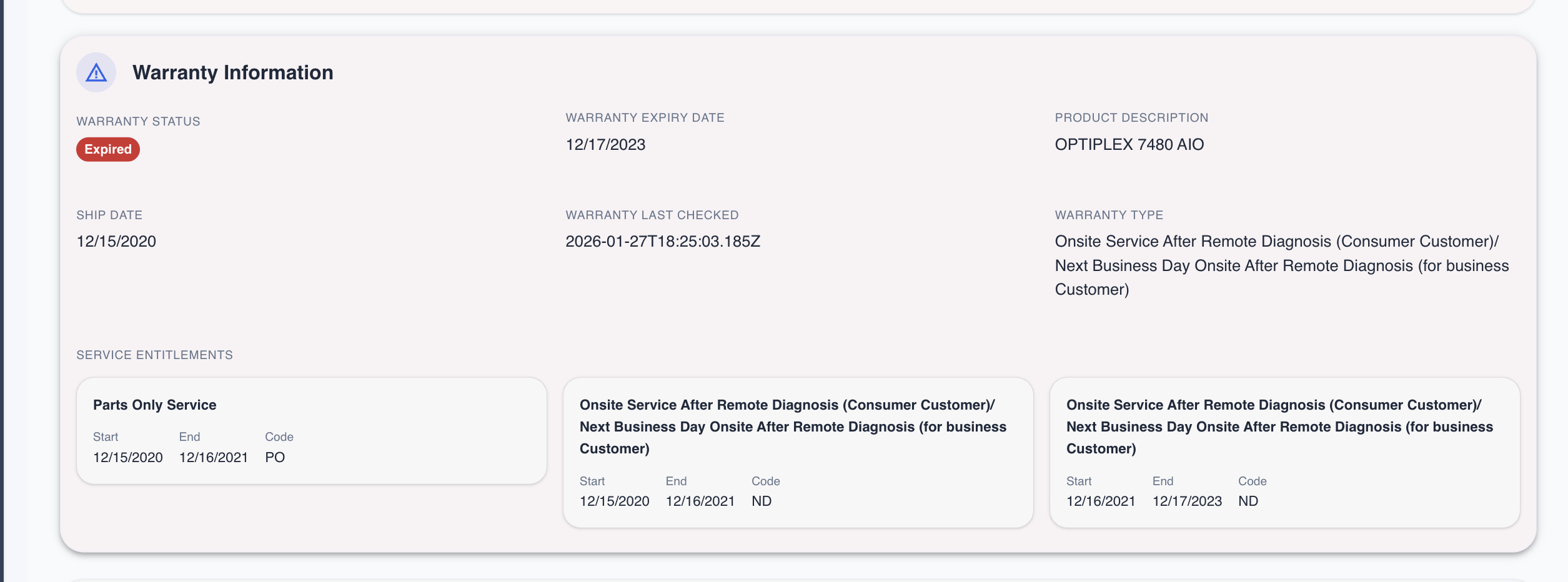
The warranty panel displays:
- Overall warranty status (Active/Expired badge)
- Key dates (expiry, ship date, last checked)
- Product information
- All service entitlements with their coverage periods
Bulk warranty view
For fleet-wide warranty visibility:
- Navigate to Reports > Asset Reports
- Select Warranty Status Report
- Filter by:
- Warranty status (Active/Expired)
- Expiration date range
- Site or department
Manual Warranty Entry
For assets from vendors without API integration:
- Open the asset in CMDB
- Navigate to the Asset section
- Enter the Warranty Expiry Date
- Save changes
For detailed warranty information, use the CI's custom fields to record:
- Warranty provider
- Contract number
- Coverage type
- Support contact
Warranty Refresh
On-demand refresh
To refresh warranty data for a single asset:
- Open the asset
- Click Refresh Warranty
- Wait for the API response
- Review updated information
Scheduled refresh
Configure automatic warranty refresh:
- Navigate to Settings > Scheduled Tasks
- Find Warranty Refresh
- Configure the schedule (recommended: weekly)
- Select scope (all supported assets or specific groups)
Best Practices
Proactive Management
- 30-Day Warning: Set alerts for warranties expiring in 30 days
- Quarterly Review: Review all expiring warranties quarterly
- Renewal Planning: Use warranty data for budget planning
Data Quality
- Regular Refresh: Schedule weekly warranty refreshes
- Verify Serial Numbers: Ensure serial numbers and service tags are correctly recorded
- Track All Assets: Include warranty data for all hardware, not just servers
Cost Optimization
- Compare Coverage: Review entitlement levels before renewal
- Bundle Renewals: Negotiate better rates by bundling renewals
- Right-Size Coverage: Match coverage level to asset criticality
Multi-Vendor Management
- Consistent tracking: Use the same warranty fields regardless of vendor
- Identify vendor: Check manufacturer field to determine which API to use
- Fallback to manual: For unsupported vendors, enter warranty data manually
Troubleshooting
Common Issues
"No warranty data found"
- Verify the serial number/service tag is correct
- Dell service tags are 5-7 alphanumeric characters
- Lenovo serial numbers must be at least 4 characters
- Check if the asset is from a supported vendor
"Authentication failed"
- Dell: Verify API Key and API Secret in system preferences; check if credentials have expired
- Lenovo: Verify ClientID in system preferences
"Rate limit exceeded"
- Wait 60 seconds before retrying
- Reduce batch size for large lookups
- Check scheduled job frequency
API Status
- Dell: Dell TechDirect Status
- Lenovo: Lenovo Support API
Related Topics
- Site Management - Physical location tracking
- Lifecycle Management - Asset status tracking
- Device Aging - Age tracking and refresh planning
- Discovery Module - Asset discovery